Vulkan and DirectX 11 (DX11) are graphics APIs that help games communicate with your computer’s hardware. Vulkan can offer better performance and lower CPU overhead in some games, while DX11 can provide more stable performance and broader compatibility in others. Neither option is always faster. The best choice depends on the game, your graphics card, your processor, and the quality of the game’s implementation.
Gamers often compare Vulkan vs DX11 when a game offers both options in its graphics settings. You may want higher FPS, less stuttering, lower input lag, or smoother gameplay on an older PC. Your choice can affect these things, but the results vary from game to game.
Vulkan is a modern, cross-platform graphics API that gives developers more control over how the CPU and GPU work together. DX11 is an older Microsoft graphics API that remains widely supported by Windows games and graphics drivers.
In this guide, you will learn how Vulkan and DX11 differ, which one may deliver better FPS, how they affect low-end and high-end PCs, and how to choose the right option for your setup. You will also learn what to do if one API causes crashes, freezes, or performance drops.
Vulkan vs DX11: Quick Answer
Choose Vulkan or DX11 based on your game’s performance, not just the API’s age.
- Choose Vulkan if your game supports it well and you want to test for higher FPS, lower CPU overhead, or fewer performance drops.
- Choose DX11 if it gives you smoother gameplay, better compatibility, or fewer crashes on your PC.
- For low-end PCs, test both. Vulkan can help a CPU-limited system, but it cannot make an unsupported graphics card more powerful.
- For competitive gaming, compare average FPS, frame-time consistency, and input lag instead of looking at FPS alone.
For example, if Vulkan gives you 120 FPS but causes frequent stutters, DX11 at a stable 100 FPS may feel better. The best API is the one that delivers consistent performance in the game you play.
What Does Vulkan vs DX11 Mean?
What is Vulkan?
Vulkan is a graphics and computing API maintained by the Khronos Group. An API, or application programming interface, allows software to communicate with hardware and other software.
Vulkan is designed to give developers more direct control over graphics hardware. It reduces much of the work that a graphics driver would otherwise handle automatically, allowing developers to manage resources and CPU workloads more carefully.
Its main benefits include:
- Lower CPU overhead in suitable workloads.
- Efficient use of multiple CPU cores when the game is designed for it.
- Support across Windows, Linux, Android, and other supported platforms.
- More control over graphics commands and memory management.
However, Vulkan is more complex to develop for. A poorly optimized Vulkan version of a game can perform worse than its DX11 version.
What is DX11?
DirectX 11, commonly called DX11, is a graphics API from Microsoft. Its 3D graphics component is known as Direct3D 11.
DX11 has been used in many Windows games for years. It offers an established development model and broad support across compatible Windows hardware and graphics drivers.
Its main benefits include:
- Broad compatibility with Windows games.
- A mature graphics driver ecosystem.
- A familiar development model for many game engines.
- Reliable performance in games optimized for DX11.
DX11 can also perform very well. Although it is older than Vulkan, that does not mean every Vulkan game will run faster.
What is the main difference?
The biggest difference is how much control the developer has over graphics operations and how much work the CPU and driver must do.
Vulkan gives developers more control over these tasks. DX11 handles more work through its established API and driver model, which can make development simpler.
The result depends on the game engine, graphics driver, processor, GPU, and optimization quality.
The Origin of Vulkan and DX11
Vulkan and DX11 come from different graphics technology families.
How Vulkan developed
Vulkan was introduced by the Khronos Group in 2016. It grew from ideas behind AMD’s Mantle graphics API and was designed as a modern, cross-platform alternative to older graphics APIs.
Its design gives developers greater control over how graphics work is prepared and submitted to the GPU. This can reduce CPU overhead and help games use modern processors efficiently.
Vulkan is not a programming language or a graphics card. It is an API that developers use to build graphics software.
How DX11 developed
Microsoft introduced Direct3D 11 in 2009. It became a common choice for Windows games because of its graphics capabilities and integration with Microsoft’s software ecosystem.
Over time, game developers built engines and tools around DX11. This established support remains one reason it continues to be useful today.
Why are both still available?
A newer API does not automatically replace an older one. Developers may keep DX11 support because many players have games, computers, and workflows built around it.
Some games offer both APIs so players can choose the option that works best on their hardware. Others support only one. The availability of Vulkan or DX11 depends on the game and its engine.
British English vs American English
Vulkan and DX11 are technical names, not alternative spellings of ordinary English words. Their names do not change between British and American English.
| Context | British English | American English | Example |
| Graphics API | Vulkan | Vulkan | The game supports Vulkan. |
| Microsoft graphics API | Direct3D 11 / DX11 | Direct3D 11 / DX11 | Try DX11 if Vulkan stutters. |
| Technical writing | Graphics API | Graphics API | Compare both graphics APIs. |
| Gaming discussion | FPS and frame time | FPS and frame time | Test FPS in the same game. |
In the UK, US, Canada, Australia, and international technical writing, these names are generally the same. Follow the official spelling of the API and the terminology used by the game’s developer.
Which Version Should You Use?
There is no universal winner. Use these recommendations as a starting point, then test the options available in your game.
| User or situation | Recommended approach | Why |
| United States | Test both APIs | Hardware and game optimization matter more than location. |
| United Kingdom | Test both APIs | There is no UK-specific API preference. |
| Canada | Test both APIs | Results depend on the PC and game. |
| Australia | Test both APIs | Use the API best supported by your game. |
| International gaming | Check platform support | Vulkan has broader cross-platform reach. |
| Academic or technical work | Use official API names | This keeps technical writing precise. |
| Business or game development | Follow project requirements | The engine and target platforms determine the right API. |
| Competitive gaming | Choose the most consistent option | Stable frame times matter alongside FPS. |
For low-end PCs
If you have an older CPU, Vulkan is worth testing because it can reduce CPU overhead in games that use it effectively. This may improve performance when the processor is the main bottleneck.
However, if your graphics card is already working at full capacity, changing APIs may produce little improvement. Lowering resolution or graphics settings may help more.
For high-end PCs
Both APIs can deliver excellent results on a powerful gaming PC. Vulkan may help in CPU-heavy games, while DX11 may be equally fast or faster in games with mature DX11 optimization.
If you use a high-refresh-rate monitor, check if either API causes inconsistent frame times during intense scenes.
For competitive gaming
Do not choose an API based only on the highest FPS number. Look at:
- Average FPS.
- 1% low FPS, which helps show how slow demanding frames can get.
- Frame-time consistency.
- Input lag and responsiveness.
- Crashes and stuttering during long sessions.
A stable 144 FPS can feel better than a fluctuating 180 FPS if the higher number comes with frequent frame-time spikes.
Common Mistakes When Choosing Vulkan or DX11
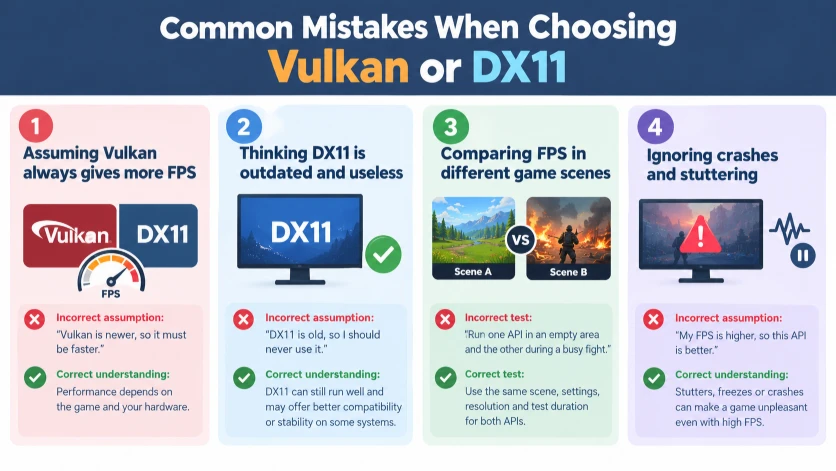
Mistake 1: Assuming Vulkan always gives more FPS
Incorrect assumption: “Vulkan is newer, so it must be faster.”
Correct understanding: Vulkan can reduce CPU overhead, but the actual performance depends on the game’s implementation and your hardware.
Memory tip: Newer API does not always mean higher FPS.
Mistake 2: Thinking DX11 is outdated and useless
Incorrect assumption: “DX11 is old, so I should never use it.”
Correct understanding: DX11 remains a capable graphics API. Many games run well with it, and it may provide better compatibility or stability on certain systems.
Memory tip: Choose the version that runs best, not the one that sounds newer.
Mistake 3: Comparing FPS in different game scenes
Incorrect test: Run one API in an empty area and the other during a busy fight.
Correct test: Use the same scene, resolution, graphics settings, and test duration for both APIs.
Explanation: Different scenes create different workloads, so the results may not be comparable.
Memory tip: Same settings, same scene, fair comparison.
Mistake 4: Ignoring crashes and stuttering
Incorrect assumption: “My FPS is higher, so this API is better.”
Correct understanding: Frequent stutters, freezes, or crashes can make a game unpleasant even when average FPS is high. Frame-time consistency is important, too.
Memory tip: Smooth gameplay matters as much as speed.
Everyday Examples
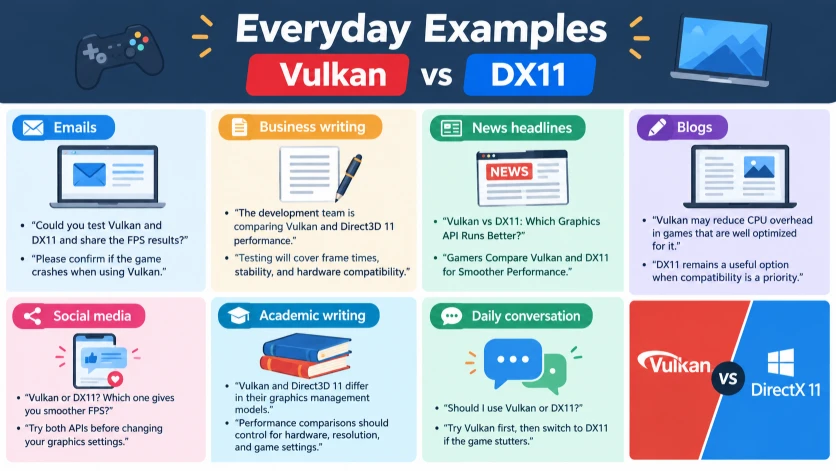
Here is how Vulkan vs DX11 comes up in common gaming situations.
Emails
- “Could you test Vulkan and DX11 and share the FPS results?”
- “Please confirm if the game crashes when using Vulkan.”
Business writing
- “The development team is comparing Vulkan and Direct3D 11 performance.”
- “Testing will cover frame times, stability, and hardware compatibility.”
News headlines
- “Vulkan vs DX11: Which Graphics API Runs Better?”
- “Gamers Compare Vulkan and DX11 for Smoother Performance.”
Blogs
- “Vulkan may reduce CPU overhead in games that are well optimized for it.”
- “DX11 remains a useful option when compatibility is a priority.”
Social media
- “Vulkan or DX11? Which one gives you smoother FPS?”
- “Try both APIs before changing your graphics settings.”
Academic writing
- “Vulkan and Direct3D 11 differ in their graphics management models.”
- “Performance comparisons should control for hardware, resolution, and game settings.”
Daily conversation
- “Should I use Vulkan or DX11?”
- “Try Vulkan first, then switch to DX11 if the game stutters.”
Google Trends and Modern Usage
People search for “Vulkan or DX11,” “Vulkan vs DX11 FPS,” and “which is better for gaming” because they want to improve performance without upgrading their hardware.
These searches often come from players who notice different results after changing a game’s renderer. Some want more FPS, while others are trying to fix stuttering, crashes, or high CPU usage.
Vulkan and DX11 are established technical terms, but their popularity varies by game, platform, and community. There is no single global popularity ranking presented here, and no exact Google Trends figures are claimed.
To compare interest in the two terms, use Google Trends and set the region and time range you want. Compare the same search category and remember that search interest measures attention, not actual gaming performance.
The most useful approach is to look for benchmarks and reports for your exact game and hardware. A result from a different game or graphics card may not apply to your PC.
Vulkan vs DX11: Quick Comparison
| Feature | Vulkan | DX11 |
| Main purpose | Graphics and compute API | Graphics API through Direct3D 11 |
| API design | Modern, low-overhead design | Established graphics API |
| CPU overhead | Can be lower in well-optimized games | Can be higher in CPU-heavy workloads |
| FPS | May improve, remain similar, or decrease | May improve, remain similar, or decrease |
| Stuttering | Depends on implementation and shader handling | Depends on implementation and driver behavior |
| Compatibility | Requires suitable hardware, drivers, and game support | Broad support in Windows gaming |
| Developer control | More explicit control over graphics operations | More work handled by the API and driver |
| Best use | Games optimized for Vulkan | Games optimized for DX11 |
The key distinction is that Vulkan offers more direct control, while DX11 provides an established Windows graphics interface. Neither one guarantees better results on every PC.
Key Takeaways
- Vulkan and DX11 are graphics APIs used by games to communicate with hardware.
- Vulkan can reduce CPU overhead and improve performance in suitable games.
- DX11 can provide excellent FPS, compatibility, and stability.
- Neither API is automatically the fastest.
- Low-end PCs may benefit from Vulkan when CPU overhead is the main problem.
- Competitive players should compare average FPS, 1% lows, and frame-time consistency.
- Always use the same settings and game scene when testing both APIs.
- Choose the API that delivers the smoothest, most reliable experience on your system.
FAQs
1. Is Vulkan better than DX11 for gaming?
Vulkan can be better when a game is optimized to use its low-overhead design. It may improve CPU-limited performance or reduce some stutters. DX11 can still perform just as well or better in other games. Test both options on your hardware before deciding which one is best for your gaming experience.
2. Does Vulkan give more FPS than DX11?
Vulkan can increase FPS in some games, especially when the CPU limits performance. However, it does not guarantee a higher frame rate. If the GPU is already fully occupied, changing APIs may make little difference. Compare average FPS and 1% lows using the same scene and graphics settings.
3. Is Vulkan better than DX11 for low-end PCs?
Vulkan is worth testing on a low-end PC if the game is limited by CPU performance and supports Vulkan well. It may reduce overhead and improve frame consistency. However, an older GPU or limited memory can still restrict performance. DX11 may be the better choice if it runs more reliably on your hardware.
4. Which is better for high FPS, Vulkan or DX11?
Neither API guarantees higher FPS. Vulkan may help in games that benefit from reduced CPU overhead, while DX11 may perform better in games with strong DX11 optimization. For high-refresh-rate gaming, compare average FPS, 1% lows, frame times, and responsiveness instead of relying on a single peak FPS reading.
5. Does Vulkan reduce stuttering?
Vulkan can reduce certain CPU-related stalls in games designed to take advantage of it. However, shader compilation, memory limits, driver issues, and game bugs can still cause stuttering. Some games may actually run more smoothly with DX11. Test both APIs and allow shader caches to build before judging performance.
6. Is Vulkan better than DX11 for NVIDIA graphics cards?
NVIDIA graphics cards support both APIs when the hardware and software requirements are met. Neither API is universally better on NVIDIA GPUs. Results depend on the game engine, graphics driver, CPU, and GPU model. Check game-specific benchmarks and compare the available options on your own system.
7. Is Vulkan better than DX11 for AMD graphics cards?
AMD GPUs can benefit from Vulkan’s low-overhead design in suitable games, but the outcome varies by game and driver version. DX11 can still be competitive or more stable in some titles. Install an appropriate graphics driver, test both APIs, and choose the one with better frame consistency and fewer problems.
8. Does Vulkan improve input lag?
Vulkan does not automatically reduce input lag. Lower CPU overhead may help a game prepare frames more efficiently, but total latency also depends on the game’s rendering queue, frame rate, synchronization settings, and display. If responsiveness matters, compare both APIs under the same conditions and use the game’s supported latency-reduction features.
9. Should I use Vulkan or DX11 for competitive gaming?
Try the API that produces stable frame times and reliable performance. Vulkan may offer better CPU efficiency in some games, while DX11 may be more consistent in others. Test during actual gameplay, not only in a quiet benchmark scene. Avoid an API that causes crashes or unpredictable stutters, even if its average FPS is higher.
10. Can I switch between Vulkan and DX11?
You can switch between them if your game supports both. Look for a renderer or graphics API option in the game’s settings or launcher. Some games require a restart after changing it. If one API prevents the game from launching, use the game’s supported launch options or configuration instructions to restore the working renderer.
Conclusion
The choice between Vulkan and DX11 comes down to performance, stability, and game compatibility. Vulkan is a modern, cross-platform graphics API that can reduce CPU overhead and improve performance when a game is designed to use it effectively. DX11 remains a strong option for Windows gaming, especially in titles that have been optimized for it.
If you have a low-end PC, try Vulkan when your game supports it. If you have a high-end PC, test both rather than assuming one will deliver better results. For competitive gaming, focus on stable frame times, consistent FPS, and responsive controls. If one option causes crashes or visual problems, switch to the other and check your graphics drivers.
For a fair comparison, use the same resolution, graphics settings, and game scene. Run each option long enough to get consistent results, and avoid judging performance from a single FPS reading.
The best choice is simple: use Vulkan or DX11 based on which one runs your game more smoothly on your PC. If you found this guide helpful, share it with another gamer who wants better performance without unnecessary upgrades.
READ MORE!
- Porcelain vs Ceramic: What’s the Difference?
- Sole or Soul: What’s the Difference?
- Herpes or Folliculitis: How to Tell the Difference

I’m Edward Fletcher, a UK-based English language writer with a passion for grammar and vocabulary. At VocabNex, I share simple explanations, useful examples, and practical English tips to help learners improve their language skills and communicate with confidence.